
One shortcut for your apps, files, sums, and windows.
Press ⌥Space, type what you want, and press Return. Jevcast opens apps, finds files, answers sums and conversions, moves windows, and brings back what you copied.
Free under the MIT license macOS 14 or later Apple silicon and Intel Build needs Xcode 26 or later and Homebrew on a supported Mac
Try a query
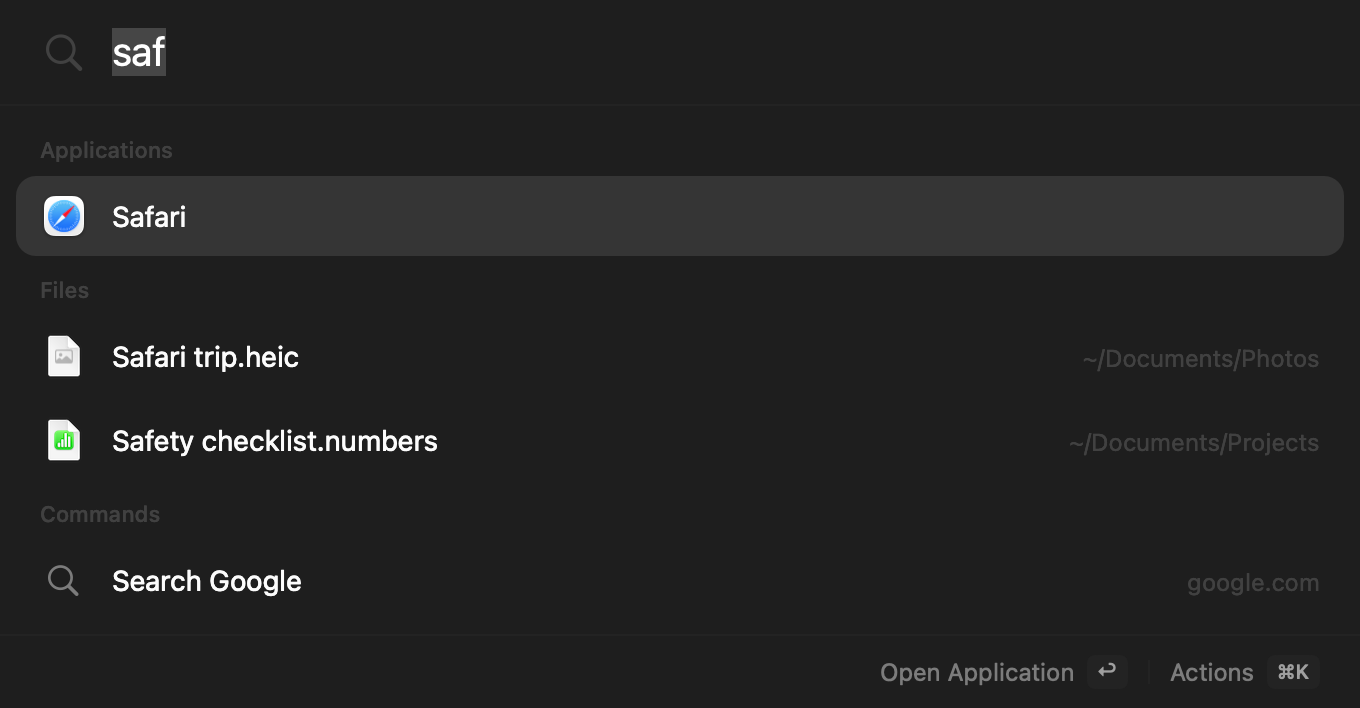
Type what you want. Press Return.
Results appear as you type. Apps and actions you use often move up the list. Right-click an app to keep it in your favourites. Click a row, or press Return.
In the launcher: ↩ open, ↑↓ select, esc close, ⌘K more actions, ⌘Y Quick Look, ⌘R show in Finder, ⌘⇧C copy the path.
Apps
safari- Opens Safari. Your own aliases work too.
time- Finds FaceTime by any word in its name.
Files
invoice- Files and folders named “invoice”.
kind:pdf in:downloads- PDFs in your Downloads folder.
files modified today- Everything you changed today.
Sums and conversions
12 * (8 + 2)- 120. Return copies it.
10 km in mi- 6.2137 mi. Mass, data, speed, and more work too.
Windows
left half- The front window fills the left half.
next monitor- The window moves to your other display.
Web
gh swiftui- Searches GitHub. Also
yt,maps,wiki, and your own. example.com- Opens the site in your browser.
Clipboard and settings
clip- What you copied: text, images, files, and links.
wi-fi settings- Opens Wi-Fi in System Settings.
Ports
port 3000- What listens there, with CPU, memory, and folder. ⌫ twice stops it.
ports- Every local server that is listening.
Commands
dark mode- Switches light and dark. Also
caffeinate,my ip, and more. deploy site- Runs a command you added yourself.
Say it your way
notes left half- Opens Notes, then puts it on the left.
search github for swift ui- Searches the site with the rest of your words.
Timers and emoji
5m tea- A timer with a notification.
timerslists them. :tada- 🎉 to copy. Shift–Return pastes it.
Tailnet
tailnet- Your Tailscale devices, with ping, load, and the pages they share.
qbit- Opens a page on your tailnet by its name.
Move windows from the keyboard.
Type a layout such as left half, or hold ⌃⌥⌘ and press one key. Press a half again to
cycle its size: 1/2, 2/3, then 1/3.
Never use Caps Lock? Turn it into a Hyper key. Hold it and press ← or → for a half, M for Mail, C for Calendar, T for a terminal in the launcher, or HJKL for arrows. The Caps Lock light is on only while you hold it.
Window control needs Accessibility access. Snapping windows at screen edges is optional. If you also use Rectangle, turn off one app’s shortcuts, so the two apps do not move the same window.
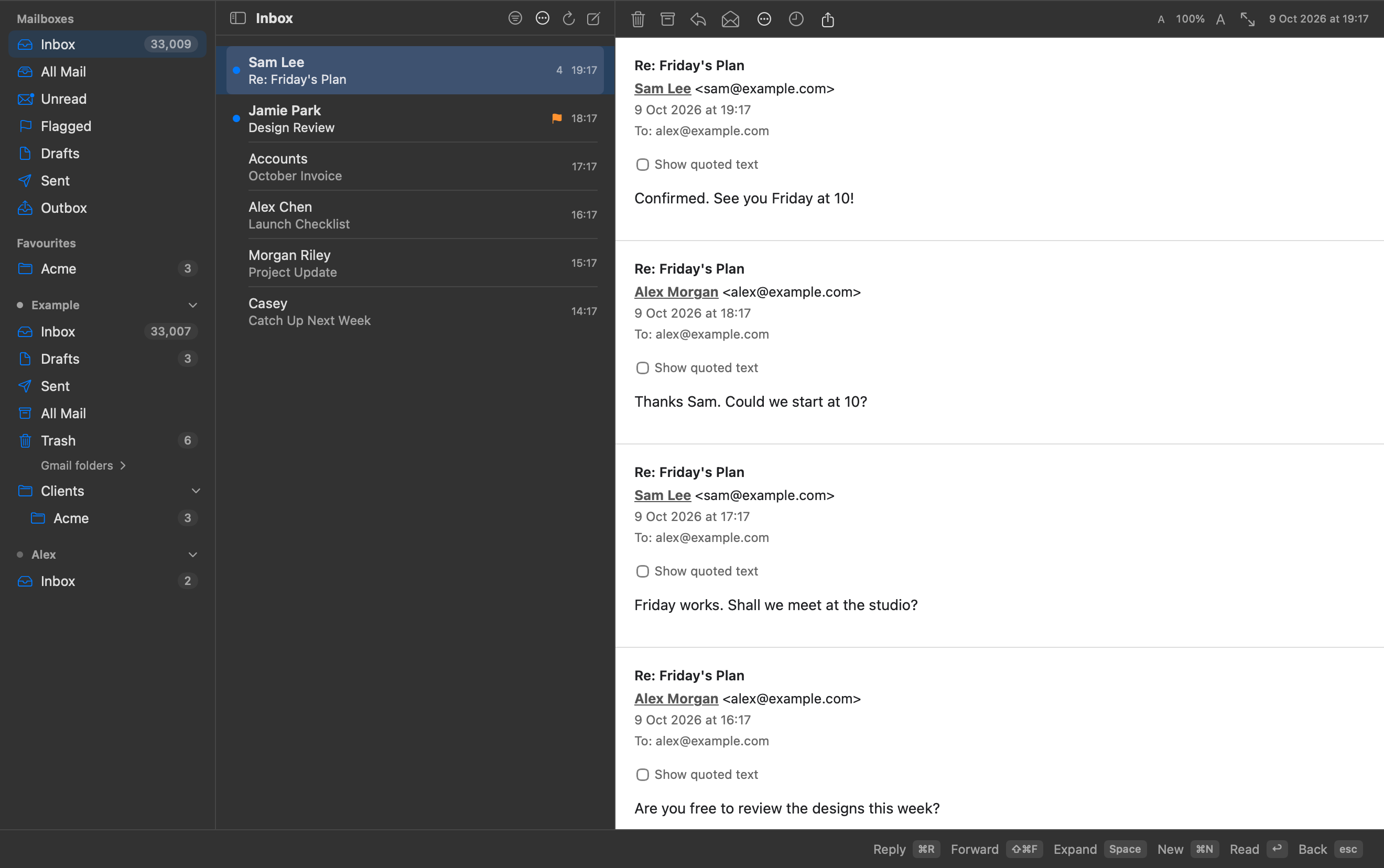
Your inbox, inside the launcher.
Hold Caps Lock and press M. Read, organise, and write mail beside your accounts and folders. Everything stays in the launcher panel.
- Keep mail offline. Choose recent mail, selected folders, or all history. Check download coverage and search the message text kept on your Mac.
- Work through your inbox. Conversation groups, filters, bulk actions, rules, smart mailboxes, and VIP senders.
- Write with care. Recipient suggestions, provider-authorized aliases, signatures, saved drafts, and explicit recovery after an uncertain send.
- Plan your mail. Snooze messages and use Send Later. Jevcast must be running and your Mac awake; missed sends wait for review.
- Keep your archives. Import and export .eml and .mbox files without changing the originals.
Your day, from one shortcut.
Type calendar or hold Caps Lock and press C.
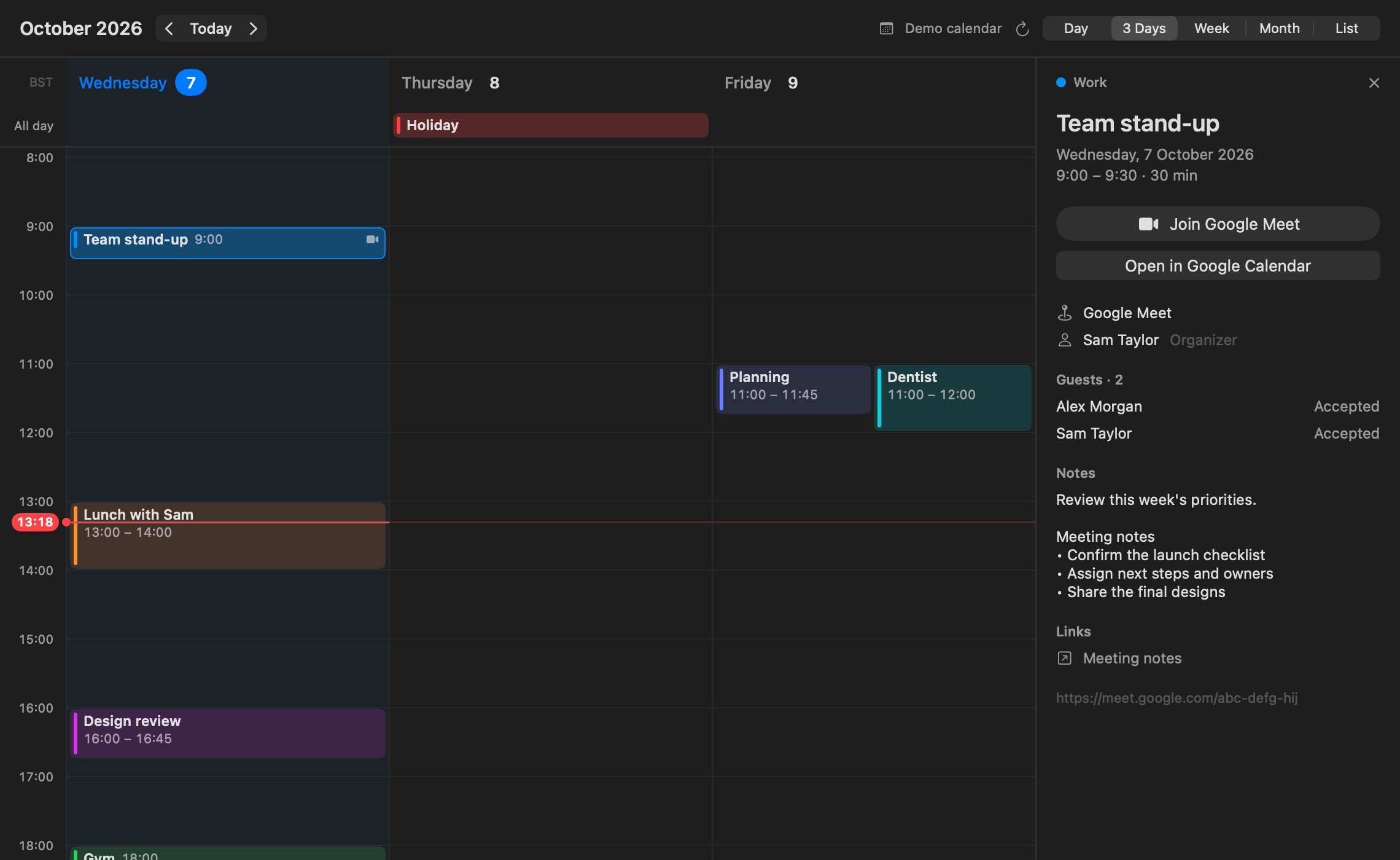
See the next three days on an hourly grid, open a meeting beside it, and join Google Meet.
- Sign in with Google. Connect your Google Calendar directly, or use calendars already on your Mac.
- See the time. 3 Days, Day, and Week have horizontal hour lines, all-day events, and a current-time marker. Month and List are there too. ← and → switch views.
- Open the details. Click an event to see its description, meeting notes, location, organiser, guests, and linked documents beside the calendar.
- Join the meeting. Open the event's Google Meet link in your browser.
- Read-only Google access. Choose which calendars to show. Jevcast cannot change or delete your Google events.
Google sign-in uses your own free Desktop app client. The setup guide shows how to enable Calendar access. A client set up for Mail can be reused.
Background work, on your terms.
Schedule scripts and agents that run on your Mac, also while
Jevcast is closed. Agents use the codex or
claude command you are already signed in to, so they
run on your ChatGPT or Claude plan.
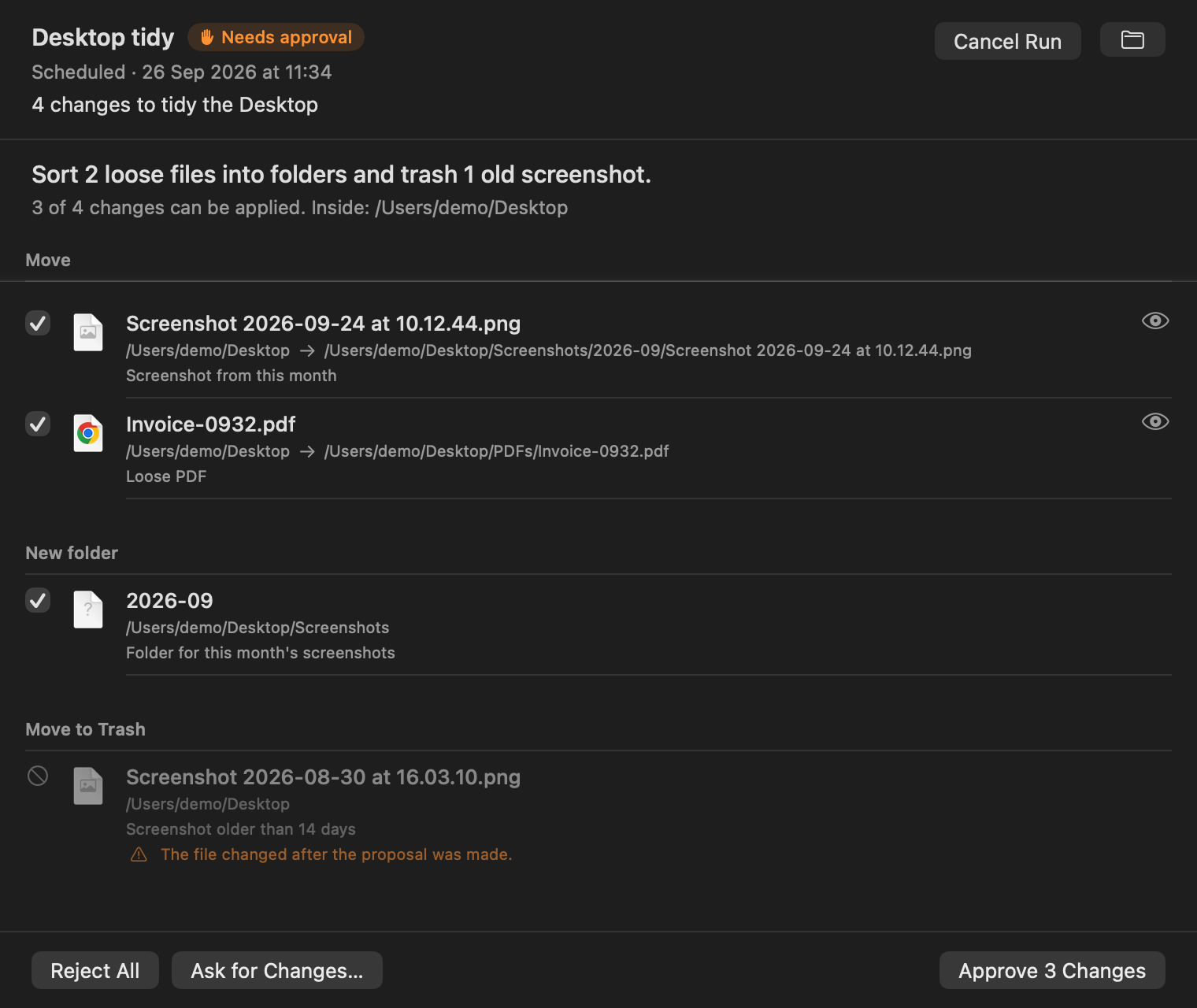
- You approve changes. An agent proposes file moves and tidy-ups. You tick what you want; Jevcast makes the change and can undo it.
- Quiet by default. No banners. A card drops from the notch when a run needs you or fails, and, if you ask for it, when a report is ready or a backup is done.
- Report workflows. An approved script plans each run. A model starts only when a report is due, and never picks a program or an argument.
- Read only unless you choose. Access is enforced by the agent's own sandbox, never by the prompt.
- Bring your Codex automations. Jevcast reads them, and imports a paused copy when you ask.
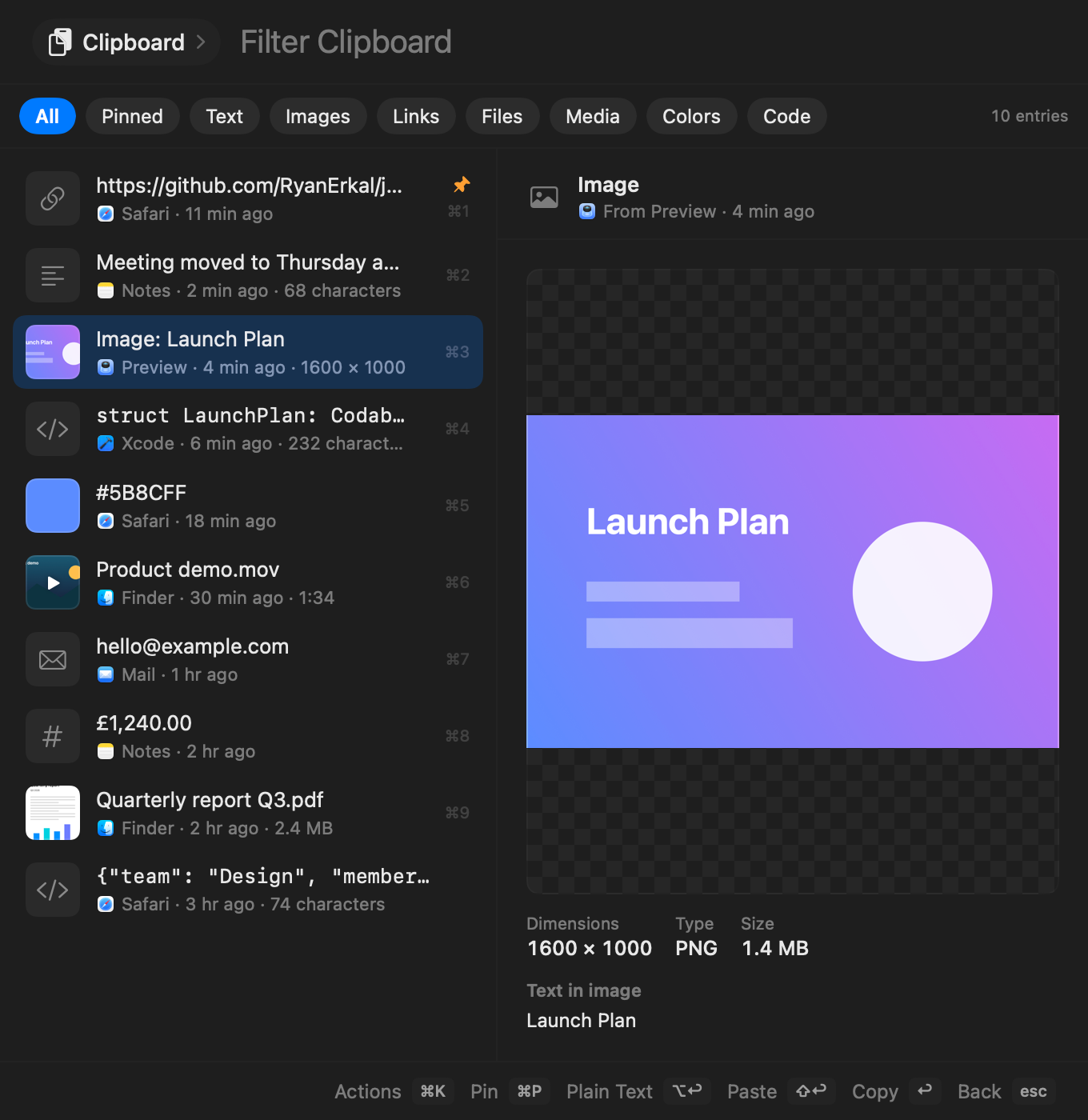
Everything you copied, one key away.
Type clip or hold Caps Lock and press V.
Text, images, screenshots, files, videos, links, colours, and code,
with a big preview beside the list.
- Find anything. Search text, file names, apps, and even the words inside images, read on your Mac.
- Copy and go. ↩ copies and closes, then paste as usual with ⌘V.
- Quick fixes. Uppercase, trim, sort lines, pretty JSON, Base64, or copy the text from a screenshot.
- Private. History stays on this Mac. Password managers are never recorded, and you choose how long to keep it.
Local by default.
No Jevcast account. No analytics. No crash reports. The app goes online for the things below, and for web images in mail you read. Mail accounts you add talk only to their own servers, over TLS. Automations run the command-line tools you signed in to yourself; Jevcast adds no network calls of its own.
-
Update check
api.github.comAsks for the newest version number once a day. You can turn it off.
Read the code -
Jev
typesafe.ai or openrouter.aiOff until you add your own TypeSafe or OpenRouter key. Sends what you type or say, never audio or command text.
Read the code -
AI writing
openrouter.aiOff until you turn it on with your own OpenRouter key. Sends what you ask. Selected text, mail, calendar, and dictation only if you turn each one on.
Read the code -
Mail accounts
your mail serversOnly for accounts you add in Settings › Mail. Talks to that account's own IMAP and SMTP servers over TLS, and nothing else. Google or Microsoft sign-in uses your own OAuth client and their sign-in pages.
Read the code -
Tailnet checks
your own Tailscale devicesOff until you turn it on in Settings › General. Asks your other devices, only at their Tailscale addresses, for their load and the pages they share.
Read the code -
Web search
your browserOnly when you pick a search or a link.
-
Google Calendar
Google sign-in and Calendar APIOnly after you connect Google in Calendar. Reads the calendars you choose and their event details. Uses its own read-only token in the Keychain. It does not use your Mail token.
Read the code
Files, voice, and clipboard never leave your Mac. HTML mail loads its web images, fonts, and style sheets by default, as Apple Mail does, and never runs scripts. Turn off Load Images from the Web in the ⋯ menu above a message.
Install
brew install zig@0.15
xcodebuild -downloadComponent MetalToolchain
git clone https://github.com/RyanErkal/jevcast.git
cd jevcast
scripts/build.sh
Needs Xcode 26 or later with its Metal Toolchain, and Zig 0.15 for the terminal. Runs on macOS 14 or later. Read the README
Install Jevcast from the official source repository: https://github.com/RyanErkal/jevcast. Check that this Mac can run Xcode 26 or later and has it installed; otherwise stop and report the requirement. Clone the repository and check out its latest published release tag; if there is no release tag, stop. Verify that `git remote get-url origin` resolves exactly to `https://github.com/RyanErkal/jevcast.git`. If the checkout has `scripts/ghosttykit.sh`, install Homebrew's `zig@0.15` and Xcode's Metal Toolchain (`xcodebuild -downloadComponent MetalToolchain`), then run `scripts/ghosttykit.sh`. Run `swift test` and `scripts/build.sh`, then verify the app with `codesign --verify --deep --strict --verbose=2 "dist/Jevcast.app"`. After those checks pass, quit any running Jev Launcher or Jevcast. Back up an existing `/Applications/Jevcast.app` before replacing it, keep all preferences and settings, install the new app, and open it. Do not bypass Gatekeeper or change macOS security settings.
What’s new
Every release, in short. Full changelog
-
1.21.3
- Compact Mail toolbars. One row each for mailbox tools and message actions.
- Deletion fixes. Delete moves loaded conversation replies to Trash. Delayed sync responses cannot restore a confirmed deletion to the local list.
-
1.21.2
- Clearer Mail. Arrow keys keep the current conversation highlighted. Replies appear together, without nested list rows or a conversation strip.
- Quiet account status. A dot shows the connection state. Click it for details.
-
1.21.1
- Source build fix. The Mail sidebar builds with Xcode 26. It keeps the same layout and controls.
-
1.21.0
- Mail stays in the launcher. Account recovery, offline storage, conversations, filters, bulk actions, aliases, and server drafts.
- Everyday mail tools. Rules, smart mailboxes, VIPs, notices, snooze, Send Later, and local archive import/export. Scheduled sends need Jevcast running and the Mac awake.
- Source release. Build from GitHub. Provider delivery and cross-device acceptance remain separate from offline checks.
-
1.20.0
- Google Calendar. Sign in with read-only access and choose your calendars. Week and Day show an hourly grid, with all-day events and a current-time marker.
- Meeting details. Click an event for its notes, location, guests, and linked documents. Join Google Meet opens the meeting in your browser.
- Mail workspace. A sidebar puts your accounts, folders, favourites, and combined views in reach. Drafts and send results survive a restart, and uncertain sends wait for your review.
-
1.19.0
- Quiet automation alerts. Automations never open a card by themselves. The pill beside the notch shows a mark: a tick, a failure, a review, a question, or an approval. Finished runs leave after a few seconds; questions and approvals wait for a click.
- Plain names. Quill is now AI writing: Ask AI, writing on selected text and mail, and Scheduled Briefs, set up in Settings › AI › Writing. Your settings carry over.
- Steady launcher. The launcher keeps your system appearance, so it stays dark over a white page in Dark Mode.
-
1.18.1
- Your automation icons. Set an icon and colour for each job. The minimized island shows them when several jobs run.
- Refined islands. Black cards, a subtle glass edge, clear progress, and smooth controls. Click outside to close a card while work continues.
- Stable interactions. Open running cards stay open when more jobs arrive. Reply drafts stay in place, and menus always target the right run.
-
1.17.2
- Window actions resize Chrome. Halves, thirds, and Maximise resize Chrome windows again, instead of only moving them. Apps with enhanced accessibility on behave the same way.
- Larger displays. A window moved to a larger display gets its full new size.
-
1.17.1
- Readable commit IDs. Automation output shows the full Git commit a backup verified, when it is labelled as one. Secrets and other long tokens stay hidden.
-
1.17.0
- Report workflows. An approved script plans the work. Each due report runs at most one fetch worker and one read-only analyst, and an approved script checks and saves it. Nothing due means no model.
- Success alerts that count. Turn on success alerts for a ready report or a finished backup. A card counts as shown only after the notch draws it.
- Safer runs. Codex runs use your ChatGPT sign-in only, start no extra agents, and stop at their time limit. A repeated failure alerts once.
- GPT-6.1 Sol in the model picker.
-
1.16.1
- Settings search.
settingsputs the app first. Panes appear only for a named request, such asbluetooth settingsorfocus settings. - App launch and ranking. Compact names such as
t3codematch spaced names. An exact name stays above favourites and past use. App launches check the copy macOS opens and bring it forward. - Typing stays in control. Late Jev answers keep your selection. Search keeps text composition intact, and holding Return cannot confirm an action twice.
- Computer-use cleanup. Clean Up lists orphaned workers for review. Attached workers and the shared service stay protected. Stopping a group needs a second Return.
- Settings search.
-
1.16.0
- A full mail app. Replies open in the reading pane, as in Apple Mail: To, Cc, Bcc, a formatting bar, and the original below your text, exactly as it is sent.
- Gmail and Outlook sign-in. Use Google or Microsoft sign-in with your own free OAuth client. Every folder of every account is in one menu, and Empty clears Trash and Junk.
- Fast with big mailboxes. Mail keeps only what you look at, so an inbox with tens of thousands of messages shows in seconds.
-
1.15.0
- Tailnet view. Type
tailnetto see your Tailscale devices: direct or relayed, ping time, load, and the pages each one shares, with their names and icons. Type a page’s name, such asqbit, to open it from anywhere. - Quick actions. Open Remote Desktop or Screen Sharing, and send files with Taildrop. Checks are off until you turn them on, and ask only Tailscale addresses.
- Tailnet view. Type
-
1.14.0
- Mail without Apple Mail. Add a Yahoo, iCloud, Gmail, or other IMAP account with an app password in Settings › Mail › Accounts. Jevcast syncs it itself, and new mail arrives within seconds.
- Safer replies. ⌘R replies in the launcher’s Mail view, and Undo Send waits 5 seconds. A message you started is never replaced, and a failed send brings your text back.
-
1.13.0
- A terminal in the launcher. Hyper–T or
/terminalopens your login shell, drawn by libghostty with your Ghostty font and colours, on the launcher’s glass. Escape closes it and the shell keeps running. - Fixes. Maps comes before its site search, timers survive a restart, the mail window has F, S, and C keys, and an old proposal no longer blocks an automation.
- A terminal in the launcher. Hyper–T or
-
1.12.3
- Mail reads like Mail. Every message you see counts as read, stays read, and shows as read on your phone too.
-
1.12.2
- Smoother notch. Alerts grow out of the notch and tuck back in with calm, continuous motion.
-
1.12.0
- Cleaner notch. Solid black, no glow, calm motion, and clear buttons.
- Keys in Settings. Every Hyper key and shortcut in its own Keys tab, as keycaps. Type
keysto open it.
-
1.11.0
- A new notch. Alerts grow out of the notch. Answer questions, approve changes, retry failures, or see every waiting automation in one list, without opening a window.
-
1.10.1
- Gmail inboxes. Gmail accounts in Apple Mail now show their inbox, sent mail, and labels.
-
1.10.0
- All your mail. The list pages through every message, All Mail shows every folder once, search reads message text, and it warns when Apple Mail is closed.
-
1.9.2
- Bigger views. Mail and the other panel views open much larger, so whole emails fit.
-
1.9.1
- Simpler Automations. Dashboards are gone. Quitting no longer hangs.
-
1.9.0
- Pick provider and model. ChatGPT (GPT-6 Luna, Sol, Astra) or Claude (Opus 5.5) for each automation, with effort and speed.
- Mail fits wide emails, zooms, and expands to full width.
- Cleaner Settings, and Jevcast never runs twice.
-
1.8.2
- Simpler Clipboard. Pins are gone. Every entry follows your history settings.
-
1.8.1
- Esc closes Hyper views. Mail, Calendar, and Clipboard opened with Caps Lock close fully on Escape. Clipboard now just copies.
-
1.8.0
- Clipboard manager. Images, files, videos, links, colours, and code with previews, search inside images, quick text fixes, and history that stays on your Mac.
-
1.7.0
- Hyper key. Caps Lock becomes a modifier for your own shortcuts: Mail, Calendar, arrows, window halves, and apps. Off by default.
-
1.6.0
- Automations. Scheduled scripts and Codex or Claude agents that run in the background, with approvals, undo, and alerts from the notch.
- Codex. See your Codex automations, read-only, with import.
- Quill. The writing helper has a new name, a model picker, and Fast as its own switch.
-
1.5.1
- Faster Calendar. Months and weeks show at once, and the list no longer stalls the panel.
-
1.5.0
- Views in the launcher. Mail with a preview, and Calendar by month, week, or list, right in the panel.
- More to type.
/lists every function, “6pm atlanta in uk” converts times, and holding Right Command dictates.
-
1.4.0
- Scheduled Quill tasks. “every weekday at 8am brief me on my meetings”, delivered as a notification.
- Jev in two steps. Jev checks the kind of request before it picks.
-
1.3.0
- Your whole Mac in one box. Calendar, reminders, contacts, tabs, history, and mail.
- Quill. Optional answers, rewrites, and mail replies. Jev decides; Quill writes.
Questions
Does it replace Spotlight or Raycast?
It works next to them and never changes their shortcuts. The shortcut is ⌥Space. If another app already uses it, choose a different shortcut in the welcome window or in Settings.
Why does it ask for Accessibility access?
Only to move and resize windows. If you do not use window layouts, skip it. Everything else works without it.
Does it search inside documents?
No. It searches file names, kinds, folders, and dates from the Spotlight index, in the folders you choose in Settings.
What is Jev?
Jev is an optional model from TypeSafe. With your own TypeSafe or OpenRouter key, it reads each request after a short pause, typed or spoken, such as “make this window bigger” or “open my coding setup”, and picks one of the app’s known actions. It never writes a command. Jevcast remembers what you chose, so a repeated request needs no Jev call, and Settings › AI › Usage shows what it costs. It is off by default, and the app works fully without it.
How do updates work?
Once a day, the app asks GitHub if there is a newer version and tells you when there is. You download the update yourself. Turn the check off in Settings, General.
How do I remove it?
Quit it from the menu bar and move it from Applications to the
Trash. To remove its settings too, delete
~/Library/Preferences/com.ryanerkal.jevlauncher.plist
and ~/Library/Caches/JevLauncher. If you saved a
TypeSafe key, remove it in Settings, Input, first.
Is it really free?
Yes. The code is open source under the MIT license. You can read it, build it, and change it on GitHub.
Build it from source, then press ⌥Space
Install from sourceFree under the MIT license macOS 14 or later Apple silicon and Intel